|
|
|||||||||
|
||||||||||




 |
|
Richard Gaskin
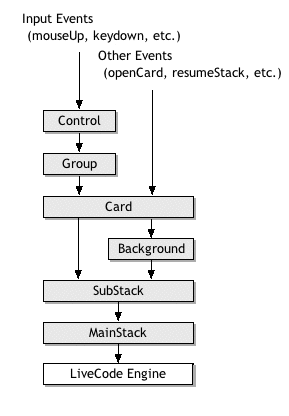
IntroductionRuntime Revolution's LiveCode scripting language has a simple yet powerful message inheritance scheme which is inherently extensible to minimize code redundancy and maximize reuse. This article describes how to use libraries, backScripts, frontScripts, and behaviors effectively to achieve those goals. LiveCode's Native Message PathLiveCode's object model is easy to learn and work with, while flexible enough to build nearly any user interface an application needs. Similar to how Visual Basic places controls on forms, in LiveCode you place controls on cards. Where LiveCode goes beyond most implementations of Basic is that it natively accommodates multiple screens, or cards, within a given window, allowing rapid development of wizards and multimedia apps easily. LiveCode goes even further to provide an object that acts as a container of control lists (cards), called a stack, which has its own script. One of the most useful aspects of this object model is that the event messages that drive it are inherited by each object in the hierarchy. For example, when the user clicks on a button control a mouseUp message is generated which can be handled in the script of the button control. If there is no mouseUp handler in the control script the message is passed to the card, and if not handled there it's passed to the stack, and then to the LiveCode engine where any default behavior may be invoked. It's worth noting that a collection of controls can be placed inside of a group object, which by default only receive system messages in response to user events in objects contained within it. Groups can be nested, and scripts within a given group can be called by other groups within it. A group can be made to receive card messages by setting the group's backgroundBehavior property. When this property is active such objects are often distinguished from other groups by referring to them as backgrounds. When receiving such messages, a background occupies a place between the card and the stack for compatibility with similar languages. If any object in the message path has a handler for a given message, by default the message is not sent further down the path. You can override this default behavior by using the pass command to allow the message to continue through the native message path: on mouseUp put "Hello World!" into field 1 pass mouseUp end mouseUp Figure 1 illustrates the simplest form of the LiveCode message path.
Figure 1: Native LiveCode message path
Extending the Message PathWhile the native message path is quite powerful, it has some limitations. For example, what if you wanted to use a library of handlers across multiple projects, or handle messages before even controls get them? Fortunately LiveCode provides three different mechanisms for extending the message path: libraries, backScripts, and frontScripts. LibrariesHyperCard first introduced libraries with the addition of the start using syntax:
The start using command inserts the script of the specific stack object into the back of the message path. A script brought into use in this way can be removed with the stop using command:
Later this concept was expanded on by Oracle Media Objects with the addition of a libraryStack message, sent to the stack object immediately after it is brought into use, useful if the library needs to perform any initialization: on libraryStack global gInited put true into gInited end libraryStack A releaseStack message is provided as a corollary to libraryStack, sent when a stack script is removed from the message path with stop using, useful for any housekeeping that may need to be done before the library is removed: on releaseStack global gInited put empty into gInited end libraryStack LiveCode supports all four of these constructs for libraries. BackScriptsSuperCard introduced two alternatives for extending the message path, which are both fully supported and improved upon in LiveCode: frontScripts and backScripts. The advantage of backScripts over libraries is that you are not limited to using only stack scripts; the script of any object can be inserted into the message path with the insert script command:
Scripts inserted into the message path this way can be removed with the remove script command:
Note that unlike libraries, backScripts receive no notifying message when they are inserted or removed. Where LiveCode has improved on SuperCard's original implementation of backScripts is that a script can be edited in LiveCode without first removing it from the message path, whereas in SuperCard the script must be removed and re-inserted to reflect any changes made while it was in the backScripts. Also, in SuperCard the order of insertion is strictly enforced, such that a script inserted after another does not have direct access to the first script's handlers and must call them explicitly using the send command (see "Changing the Firing Order of Messages" below). In LiveCode all libraries and backScripts can freely call each others' handlers by name, with the order of insertion only coming into play in the event that two scripts contain handlers of the same name; in such cases libraries take precedence over backscripts, and scripts inserted first take precedence over scripts inserted later. FrontScriptsFrontScripts are inserted into the front of the message path, before any other object gets a message. This can be useful for implementing logging features where you can write a record of user activity to a file, or for implementing plugin utilities where you might want the plugin to have access to messages like selectedObjectChanged in order to update itself. Like backScripts, frontScripts are inserted and removed with the same commands:
Figure 2 shows the LiveCode message path with all extensible scripting options.
Figure 2: LiveCode message path showing Using BehaviorsLiveCode 3.5 introduced behaviors, which allow you to use the script of any button to handle messages for any number of objects, but unlike libraries and backScripts they don't affect any other objects in the message path except those for which they are assigned. Behaviors are a very powerful addition to the language, taking the first serious steps toward object-oriented programming while preserving the ease and simplicity of LiveCode. With behaviors you can in effect design classes of objects, using a single script to define the action of any controls, keeping your code well factored and easily maintainable. A behavior object is simply any button. You assign this behavior to any other object by setting the behavior property to any valid button object reference, such as the button's long ID:
Once an object has a behavior assigned to it, any messages go to the object first, then to the behavior script, and then continue along the message path as normal. For example, if you're working on a project in which you have a lot of fields that accept numeric input and you want to prevent non-numeric characters from being entered, you can put this script in a button which will be used as the behavior object:
Now that you've defined how you want to handle the keyDown message, you can apply that behavior to any field using the behavior property as shown above, just setting the behavior of your field to the long ID of your behavior button. A single behavior button can be applied to any number of objects, so you could have all the numeric input fields in your project use the same behavior. If you ever need to modify that behavior you only have to deal with that one script in the button you used to define the behavior. And because messages are sent to an object before that object's behavior script, you can override any handler in the behavior script in the object's script, or overload the behavior by handling it first in the object and then using pass <messageName> to allow the message to be inherited by the behavior script. Using me and Script-Local Variables in BehaviorsIn most scripts using me refers to the object containing that script, but in a behavior script me is handled differently, referring instead to the object for which the behavior is assigned. Continuing with our numeric field example, if you want to get the text of the field using the behavior script, in the behavior any reference to me will refer to the field object rather than the behavior button, so you could use get the text of me in the behavior and it will get the text of the field that uses that behavior. This allows you to write your code using the same conventions you would if you were scripting in the field object itself. Similarly, any script-local variables within a behavior script are maintained separately for each object to which the behavior script is assigned. If you have two fields using the same behavior script, they will have separate sets of script locals within the behavior script. The special handling of me and script-local variables in behavior scripts allow you to move code from individual objets into behaviors with minimal modification. Protecting Behavior ScriptsA behavior button can be stored in any stack in the environment, so if you want to protect your behavior scripts you can put those buttons in a password-protected stack. This can be useful for just about any commercial project and is especially useful for delivering third-party custom controls for the LiveCode community, so that your users can put objects using your behaviors in any stack while still protecting the scripts in the stack that contains your behavior buttons. Note that password-protecting scripts is only available in the Commercial version of LiveCode. The Community Edition is governed under the Gnu Public License which requires making source code available, so any means of preventing access to scripts with that edtiion would be logically incompatible with its license terms. How Behavior References Are Resolved at RuntimeBecause a behavior is assigned as a property of an object, as long as you save that object after you set its behavior property you need not set it again. But to make sure the engine will be able to find any assigned behavior objects, you'll want to make sure that the stack containing your behavior objects is loaded into memory before opening any stack with objects that refer to those behaviors. Also note that the engine does not keep track of name changes for behavior objects, so if you change the name of a behavior button, or move it to a different card, or change the name of the stack it's in, any object refering to it by its original reference will not be able to find it, and those behaviors will not longer be associated with the objects that had used them. While this restriction might seem a bit onerous at first, it's necessary to allow the engine to find your behavior objects and not too hard to live with if you give useful names to your behavior buttons and the stack they're in before assigning them to other objects. And thankfully, when you assign the behavior property of an object the engine only stores the short name of the stack containing the assigned behavior button, so as long as you keep the behavior button in the same stack and don't change its name or its stack name, it'll continue to be found even if the file path to the stack changes, such as when you deliver your software to your users. Limits, Flexibility, and Performance of BehaviorsCurrently an object can have only one behavior property assigned at a time, which means you can't assign multiple behaviors to emulate true OOP implementations, but it also means you can easily swap out behaviors on the fly by just reassigning the behavior property if you like. As of LiveCode v6.0 behaviors can be nested; that is, a behavior script can have its own behavior script, effectively allowing a form of "subclassing". It's also worth noting that you can assign behaviors to any object, not just controls. Behaviors can be assigned to groups, cards, and even stacks. So if you need to give a control more than one behavior, you can put that control in a group and assign a behavior for that group; with that setup messages will go first to the control, then to the control's behavior script, then to the group, then the group's behavior script, before resuming the rest of the normal message path. If you're interested in how efficiently behavior scripts perform relative to alternatives for sharing handlers among objects, see this post to the use-livecode list. Figure 3 shows the complete message path with behaviors:
Changing the Firing Order of MessagesWhile messages ordinarily travel only through the message path as shown in the figures above, you can invoke handlers in scripts of objects outside of the current message path with the send and call commands:
The difference between the send and call commands is that the send command changes the context so that object references are treated as relative to the object you send the message to, while the call command does not change the context and continues to treat object references relative to the original object. The dispatch command is similar to send, but with two advantages: it allows a more graceful way to send arguments using the optional with portion, and benchmarks about 30% faster. I don't know why dispatch is so much faster than send, but in my tests the performance advantage is consistent enough that I tend to use it in place of send for everything written for v3.5 at later. With send and call you can send only one string to the target object, so if you want to include any parameters with your call you need to include them there. For example, here we send the value "44" as an argument to the call to a handler named GetObjInfo: send "GetObjInfo 44" to button "Tester" Sending params with send and call can get a bit tricky, since the string is evaluated when it's sent, so you'll have to be careful to put multi-word values in concatenated quotes, e.g.: send ("GetObjInfo ""e&"44 88""e) to button "Tester"
Dispatch makes this much simpler with its optional with phrase, where you can pass arguments to a command just as you would if you were calling it directly in the message path, even passing in arrays if you like: put "100" into tMyArray[1] dispatch "AddThis" to button "Tester" with tMyArray
Special ConsiderationsScriptLimitsOne thing to keep in mind when using libraries, backScripts, and frontScripts is the difference in the number of each of these allowed when running outside of the LiveCode development environment, such as in a standalone or with a player. These limits are noted in the scriptLimits function, which (as of this writing) at runtime returns 10, 10, 50, 10 when running as a standalone, which corresponds to (in order): • the number of executable statements permitted when changing a script (10) These limits only apply when running outside of the LiveCode development environment. When working in the LiveCode development environment no such limits exist. Purging StacksLiveCode gives you the option of determining whether a stack will remain cached in memory or be purged when it is closed. This is determined by the destroyStack property, which is set to false by default. The name of this property refers only to the copy of the stack in memory; when true, a stack is purged from memory when closed. You have to be careful if the stack containing scripts that extend the message path, either with the start using or insert script commands, has its destroyStack property set to true. As of this writing, as soon as you close the stack all of its scripts will be removed from memory with it, so they will no longer be present in the message path.
|
|||